Showing posts with label CPU Cooler. Show all posts

Sunday, 25 May 2014

Unboxing & Review: Prolimatech Samuel 17 Low Profile CPU Cooler


When it comes to small form factor build, huge and tall CPU coolers is usually something small form factor PC builders would want to avoid as there will not be much space available in most small form factor PC chassis that will fit those colossal CPU coolers - This is where low profile CPU coolers come to play. 

We have the Prolimatech Samuel 17 sent to us for today's review, courtesy of Prolimatech. The Samuel 17 is Prolimatech's only low profile CPU cooler that offers an amazing total of 6 heatpipes and 120mm fan support. Let's see how well can this David handles the Goliath of our test rig (i7 4770K) shall we?

*The Samuel 17 is priced at $44.99 from newegg, estimated to be around RM145 after converting to our currency of Malaysian Ringgit.*

Technical Specifications
Fan Compatibility
Standard 120mm Fan
Slim Type 120mm Fan
140mm fans with 120mm mounting holes
CPU Socket Compatibility
Intel LGA 775/1366/1156/1155
AMD AM2/AM2+/AM3/AM3+
Dimension
121.2mm x 120mm x 45mm 
Weight
410 g 
Heatpipe
6 pieces of 6mm in total


Overview

The Samuel 17 comes in a rather simple and compact packaging, not very attractive from our point of view.


The included accessories are Intel and AMD mounting bracket, screws, user's manual and a generous amount of thermal compound from Prolimatech.


Our first impression on the Samuel 17 is that the cooler is light and compact but very solid in terms of build quality. The 120mm fan frame is seems extended beyond the actual size of the fins, installing a fan will leave an extra space to allow air to be blown down to components below for that extra cooling effect.


140mm fans that has 120mm mounting holes on its fan frame can be installed on the Samuel 17, a good example would be Prolimatech's very own Ultra Sleek Vortex 14.


A quick comparison in height with the Western Digital MyPassport Elements external hard drive.
45mm in height makes it as one of the thinnest low profile CPU cooler available and it's very ideal for small form factor build, HTPC especially.


Moving on to the base of the Samuel 17, we're totally surprised by the numbers of heatpipes available.
Most low profile cooler we've seen only comes with a maximum of 4 heatpipes, the Samuel 17 has a total of 6, much like most large CPU coolers - but will it act like one of the large CPU coolers?


Installing the mounting bracket was a breeze.


While not having any backplate for mounting the cooler, these little guys will do the job.
The plastic spacers act as an insulation layer to prevent any potential electric conductivity on it's contact point with the motherboard.


Mounting the cooler won't be much of a trouble if the motherboard is not yet in the chassis.


We've found out that there's 2 different ways to install the Samuel 17. The first orientation, as shown in the picture above, the fins were very close to the RAM module thus will only allow you to install value RAM at most.


Turning the Samuel 17 around seems to solve the aforementioned issue hence will allow installation of almost any type of RAM with zero clearance issue.


Performance Test
Moving on with the performance test, the following system configuration is prepared for our test:
Test Rig Configuration
CPU Cooler
Prolimatech Samuel 17 (with Prolimatech USV14 installed)
Intel i7 4770k Stock Cooler
CPU
I7 4770K (running at stock clock speed)
Motherboard
ASUS Z97I-PLUS
Memory
Corsair Vengeance Pro 4GB x 2
Primary Hard Drive
Crucial M500 120GB
Power Supply
Silverstone ST60F-P 600W 80 Plus Bronze Certified
Chassis
Jonsbo V4
Display Monitor
Dell U2312HM

CPU stress test is conducted using the Prime95 with the option 'In-place large FFTs' for maximum heat output from the CPU itself and the room temperature where the test is conducted varies from 28ºC to 30ºC. The test that we've ran consists the following different setup:
  • Samuel 17 without fan
  • Samuel 17 with Prolimatech USV14
  • Samuel 17 with Prolimatech USV14 equipped with the Static Booster 14
  • Intel i7 4770K Stock Cooler
The test is done repeatedly for several days so we can obtain the average temperature for each setup and the final result is presented in the graph below:


Fanless setup is giving a pretty high temperature reading even on stock clock speed, but it still beats the Intel stock cooler that runs on a fan. The setup with Prolimatech USV14 installed is giving even better temperatures, an impressive temperature drop of at least 18ºC difference in compared to the Intel i7 4770k stock cooler. Adding the Static Booster 14 to the USV14 yields even better result, giving another 2ºC drop in temperature. Do note that there are wide variety of fans out there that would produce different result from ours.


Final Thoughts
We have our sizzling hot Intel i7 4770K setup installed in the Jonsbo V4 as the example of the imaginable worst case scenario for a small for factor build /HTPC and the result turns out pretty well as Prolimatech Samuel 17 did a wonderful job in keeping the temperature down in such confined space in our setup.

The small but mighty Samuel 17 is definitely one of the best low profile CPU cooler we've tested and we would not hesitate to recommend to anyone who requires good cooling for their CPU (running at stock clock) in a confined HTPC or small form factor gaming rig.


Pros
Ideal for small form factor build or HTPC
Small and solid
Supports 120mm fans and almost any larger fans with 120mm mounting holes
Very generous amount of thermal compound included
Easy to install
Almost no clearance issue with tall RAMs

Cons
No fans included
Screws for slim type fans is rather short but suffice
Clearance issue with motherboard with tall heatsink / armor

The Prolimatech Samuel 17 is a worthy product and is awarded with recommended and gold award from Tech Critter.


Monday, 13 January 2014

Unboxing & Review: The Black Edition CPU Cooler from Gelid Solutions


It's been awhile since the last time we've been dealing with air coolers ever since the self-contained liquid cooler started invading the PC building scene. Today in our review, we have something rather interesting with us,The Black Edition CPU Cooler by GELID Solutions. GELID Solutions is like a hermit in the PC cooling scene and isn't much aggressive in pushing their products over the years, but for those who have tried their product will know the real deal. Not known to majority of the local builders who has just getting started to join the scene, GELID Solutions is pretty much known only by those who has been in the scene for years.

Priced at 77.99 US Dollar at newegg along with the infamous twin tower design, is the ace of GELID Solutions really something worth investing for if you're still into the air cooling league?


Features

Air Flow (CFM/CMH):Slim 12 PWM: 52.4 / 89.1 max. / Silent 12 PWM: 58 / 98.6 max
Bearing:Hydro Dynamic Bearing
Cable Length (mm):350
Current (A):Slim 12 PWM: 0.2 max. / Silent 12 PWM: 0.18 max.
DC Voltage (V):12
Fan Dimensions (mm)Slim 12 PWM: 120(l) x 120(w) x 15.8(h) / Silent 12 PWM: 120(l) x 120(w) x 25(h)
Fan Life Time MTTF at 40C (h):50'000
Fan Speed (+/- 10% ) (RPM):Slim 12 PWM: 750 - 1600 / Silent 12 PWM: 750 - 1500
Heat Sink Dimensions (mm):109(l) x 126(w) x 160(h) (incl. Fans)
Noise Level (dBA):Slim 12 PWM: 25.4 max. / Silent 12 PWM: 25.5 max.
Static Pressure (mmAq):Slim 12 PWM: 1.35 / Silent 12 PWM: 1.6
Warranty (years):5 years from GELID Solutions
Weight (g):990 (Heatsink & Fans)

Overview


Our first glance at the packaging, pretty compact and straight forward design along with the details without any unnecessary elements on the box.


From the side of the box is some pictures of the product from several angles and features of the product. The Black Edition comes with a warranty of 5 years, which is pretty attractive offer as not much air coolers we've came across offers warranty this long! 


A good approach for large heatsink like this, main body of the Black Edition is flanked by two pieces of foam that helps to absorb shock that will damage the heatsink.


The Black Edition has a smooth copper base and 7 large heatpipes on each side of the tower. The basic idea here is that the heat is absorbed by the copper plate and then transferred to the fins via these heatpipes to be dissipated - having more heatpipes helps to transfer the heat through multiple path hence, giving better cooling performance.  


Leaving its protective foam, here rise the Black Edition. It isn't really that black as its name actually, other than having black colored fans and the black colored top cover for each side of the tower.


From the side we can see that there's something different about the tower compared to most conventional twin tower air cooler we've seen so far. The side of each tower is covered for a more directed airflow through the fins in straight line, it is unlikely for the head to escape from the side with this design.


Comes with the box, there's two PWM fans included with the Black Edition.  


A view from another angle and you can see how dense the heatsink actually is. This is really good as better performance is expected and the directed airflow design where the side of the fins is covered is an additional point to it.  


Now with the accessories included: installation kit for AMD/Intel CPU, mounting screws, spacers that works as insulator, fan splitter, GC Extreme thermal compound and the fan clips for additional fan installation.


The thicker PWM fan seems like a pretty normal fan but the slim type fans is really something we'd say, one of a kind.


you can see the difference in thickness of the fan, the slim type fan is like 3/5 of the standard ones.


The fan is held firmly on the heatsink by the fan clip included. Installation might be a little tricky for those who never in their entirely dealing with fan clips though. 


As we only have an Intel system with is, the installation will be covering Intel based CPU. The backplate comes with a specially designed slot where the most outer part is for 1366/2011 socket, following by 1155/1156/1150 socket and lastly the 775 socket. 


The slot is really well designed as the helps to keep the mounting screws in place, no extra work and hassle free.


once the backplate and the screws is firmly held in place, this is how it looks like from the front view.


The screws is then secured using these thumb nuts included with the packaging.


After the thumb nuts is secured firmly, you can place the bracket on. There's also given slots for different socket on the bracket, there won't be any issue having it to stay in place.


After the bracket is placed on, secure it with the other thumb nuts and this is how it'll looking like after the work is done.


After applying your thermal compound, you will need to hold the entire heatsink firmly and secure it using a pair of screws with springs on it.  Align it properly and fasten it with some additional force applied so that the screws can reach the hole below, a long screw driver will help to keep the installation easier of course.


This is how everything will look like after the installation is done, much huge we would say.


There's some issue with the RAM clearance though, tall RAM can only be installed in the B channel while very low profile RAM shouldn't have this issue.


Testing Method

Our testing methodology will be the usual CPU stress test with Pime95, conducted under ambient room temperature of 30ºC with the following setup:

Test Rig Configuration
CPUi7 4770K overclocked to 4.2GHz
MotherboardAsus Sabertooth Z87
MemoryCorsair Vengeance Pro 1600 MHz 4GB x 2
GraphicsAsus GTX680 DirectCU II OC - stock speed
Power SupplySilverstone ST60F-P 600W 80+ Bronze
DrivesWestern Digital Caviar Blue 500GB
Chassis
Jonsbo QT01

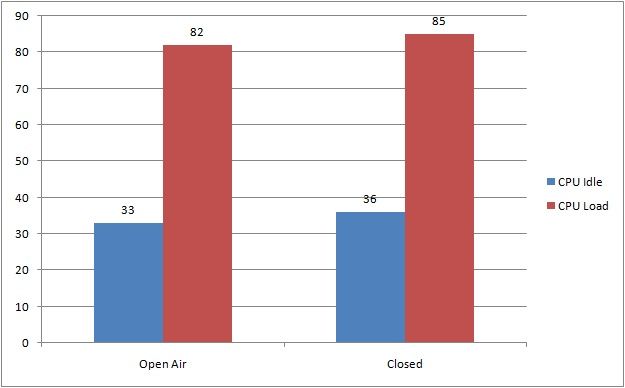
In this test, we have 2 different scenario : 
1. side panel of the chassis is closed
2. side panel of the chassis is opened

Both test uses the maximum heat stress test on Prime95 to test the efficiency of the Black Edition. The duration of the test is 30 minutes for each and the result is shown in the graph below. 


The result is rather pleasing, the i7 4770K we have here is pretty much a let down as it produces massive amount of heat - much more than its predecessor. The Black Edition along with the GC-Extreme thermal compound did a fine job in keeping this sizzling hot chip at a fine temperature. 

The fans however, is rather noisy compared to some of the competitors especially Noctua. We believe that the Black Edition can did a whole lot better in both acoustic and thermal performance if you're willing to invest more in some seriously good fans but as far as it goes, it is still a pretty good performance you'll get out of the box.


Final Thoughts


After going through the Black Edition, we have to say that it is a solid performer that is able to perform as good as some highly rated air coolers but at the same time, there's some drawback you might want to take note:

Pros
- Solid fins which is less prone to accidental bending
- Dense fins and sealed side for a much focused airflow
- Large heat pipes for best heat transfer
- The included GC-Extreme is a heaven's gift, most manufacturer will give you thermal compound which we consider as not-so-useful.
- Tool free installation, you can basically secure all the included nuts and screws without using any tools

Cons
- Fans is rather noisy at full load
- RAM clearance issue, bad news for performance RAM with monstrous heatsink

The drawbacks won't be much of a concern if you fits the criteria of not having picky ears, uses low profile RAM or install dual channel RAM on the B channel. 

Making decision isn't a tough job for us as we do have picky ears, basically the cons is our concern is building a system. Without any hesitation, the Black Edition deserves a Silver Award and Recommended Award for the great features and great value.


Friday, 3 January 2014

Cooler Master Nepton 140XL Reviewed


It wasn't really a surprise to us when Cooler Master announced their involvement in the self-contained liquid cooler in the early November 2012 with their very own design of self-contained liquid cooler - the Seidon Series, as almost every manufacturer in the PC cooling industry is keeping up with the trend.

Cooler Master had the Seidon Series liquid cooler designed in-house and this helps to reduce the cost of production. Therefore, the Seidon Series is among the best closed-loop liquid cooler money can buy, the Seidon series offers users with a fairly decent performance at the sweet spot price ranging from their top of the line 240mm radiator Seidon 240M is available at 349 Malaysian Ringgit to the entry 120mm Seidon 120V at a very affordable price of 189 Malaysian Ringgit.

Our review for this time is something rather new - yet to be announced to the Malaysian local market, the Cooler Master Nepton 140XL. Soon to be available on the shelf at the price of 349 Malaysian Ringgit, what does the Nepton 140XL offers compared to other coolers which is in the same league? We'll find out soon enough after this review.


Features


Warranty2 Years from Cooler Master
CPU Socket SupportIntel LGA 2011 / 1366 / 1150 /1155 / 1156 / 775
AMD Socket FM2 / FM1 / AM3+ / AM3 / AM2
Dimension75mm x 69.8mm x 49.1mm
Radiator Dimension171mm x 139mm x 38mm
Fan Dimension140mm x 140mm x 25mm 
* 2 pieces of JetFlo 140 incl
* optional: 120mm fans can be mounted as well
Fan Speed800~2000 RPM (PWM) ± 10%
Fan Airflow0.7~3.5 mm H2O ± 10%
Fan Bearing TypeRifle Bearing
Radiator MaterialAluminum
Water Pump Life Expectancy70,000 hours
Fan Life Expectancy40,000 hours
Rated VoltagePump: 12 VDC
Fan: 12 VDC

Unboxing

Before starting with the review, we would like to thank Cooler Master for giving us to opportunity to review their new Neptop 140XL which will soon be launched to our local Malaysian market.


On first glance, the packaging of the Nepton 140XL seems to emphasize their improvement from the previous generation of Cooler Master's self-contained liquid cooler with details printed in front, e.g: Extreme Cooling Performance, Extra Large 140mm Radiator, Durable FEP Tubing, Ultrafine Micro Channel that doubles the surface area. This is Cooler Master's first and ever self-contained liquid cooler with 140mm thick radiator.


What's inside the box is the Nepton 140XL, a pair of Cooler Master's latest JetFlo 140mm fan,  accessories which includes the retention bracket, screws etc, user's manual and warranty guide.


As you can see from the included accessories, consisting the screws for mounting both JetFlo 140mm on the radiator, retention bracket for Intel and AMD, fan splitter, thermal paste, plastic clips, etc.


Up next is the warranty guide and the user's manual for Nepton 140XL - a very important and helpful guide especially for first timer!


Nepton 140XL comes with a pair of JetFlo 140mm PWM fans, allowing you to configure for a push pull setup  right out of the box. By analyzing through the details of the included JetFlo 140mm fans, we came to notice that the included JetFlo 140mm uses rifle bearing instead of POM bearing used on the retail JetFlo 120mm.


*About Rifle Bearing*
Rifle bearing fans are similar to sleeve bearing, but are quieter and have almost as much lifespan as ball bearings. The bearing has a spiral groove in it that pumps fluid from a reservoir. This allows them to be safely mounted horizontally (unlike sleeve bearings), since the fluid being pumped lubricates the top of the shaft. The pumping also ensures sufficient lubricant on the shaft, reducing noise, and increasing lifespan. 

From the details above, JetFlo 120 is boasted with life expectancy of 160,000 hours while the JetFlo 140 has a life expectancy of 40,000 hours which is 4 times lower than the retail JetFlo 120. 


The fans included is sleeved ready out of the box. These sleeves helps to protect the fan cables from accidental damage, while giving the fan itself a premium look compared to those non-sleeved fans.


The rubber pads on each side of the JetFlo 140, it helps to absorbs vibration on contact point produced by moving parts that may causes the production of noise. Cooler Master has done a fine job improving their fan design, much better than their previous generation of fans.


This unique designed fan blade is said to be able to produce high airflow and giving out low noise at high rotation speed. This will be confirmed after the review.


And here's the main body of the Nepton 140XL. The pump looks much larger and thicker compared to the pump of the Seidon series self-contained liquid cooler. The FEP tubing and the radiator seems to be thicker as well.


Below the pump is the copper plate to transfer heat from your CPU to the liquid that passes through the micro channel on the copper plate. Unlike the previous generation, the Nepton 140XL copper plate is secured with an uncommon looking screws which can only be seen from a professional screw drivers kit.


Check out the thickness of this radiator! From our observation, it is way much thicker compared to any other radiator of self-contained liquid cooler we've encounter so far. 


On the radiator itself, there's a warning message on a piece of sticker that warns user not to tamper the knob in the radiator. This is where you can change the coolant within the closed loop, but removing it will instantly void the 2 year warranty covered by Cooler Master. Better think twice before proceeding with what you plan to do with it.


The radiator is rather special - a 140mm radiator that supports both 140mm and 120mm fans. It's not a common design we've seen on most conventional radiators. Cooler Master did a good job for taking 120mm fan mounting into account, as most chassis available out there uses 120mm rear fan and this helps to give better compatibility for chassis that doesn't comes with any 140mm fan mounting.


Compared side by side with the Corsair H100, there's a very significant differences - Nepton 140XL has a much thicker radiator and thicker FEP tubing as well. To those who concerns about the stiffness of FEP tubing used, we can assure you that the FEP tubing on the Nepton 140XL is much flexible than the conventional FEP tubing from the previous generation self-contained liquid coolers that uses CoolIT FEP tubing design. Again, Cooler Master did a fine job in improving the flexibility of FEP tubing by increasing the diameter of the FEP tubing. 


Installation


Moving forward to the installation, we will be using the Intel retention bracket - since we will be testing in with an Intel setup. The installation is pretty straight forward, the Intel bracket is inserted from the bottom slot available and can be secured with the screws included.


The backplate on the other hand, uses a rather unique way of securing their mounting screws.


A small piece of plastic clip is used to hold the mounting screw in place. The plastic clip will held firmly to the slot according to the type of socket: deepest inside is the 775 socket, following by the middle is 1156/1155/1150 socket and lastly located as the most outer part of it is for the 1366/2011 socket.


Here's the mounting screws which is now secured in place. The plastic clip act as an insulator as well, having a gap in between the contact point of the backplate and the motherboard.


Now mounted firmly on the CPU, the Nepton 140XL is ready to be unleashed. The picture above is one of the way you can mount the radiator, but do note that there's a motherboard compatibility too - especially for Asus motherboards that comes with the thermal armor. As for RAM clearance, there's no issue at all for the Nepton 140XL compared to some gigantic air cooler heatsink. 


The Cooler Master Cosmos SE is one of the recommended chassis that supports the Nepton 140XL.


Testing Method


In this section of review, we will be using the test rig as listed as below to conduct our temperature test:


We will be doing a small comparison in performance with the Corsair H100 and the Cooler Master Nepton 140XL. The test is conducted in a room with ambient temperature of 28ºC, active air intake for the system is through a pair of 120mm fans in the front of the chassis and the exhaust consists only fans mounted on the radiator of each cooler. Our stress test on the CPU is done using Prime95 with maximum heat stress test.

The test is done separately with the Corsair H100 and the Cooler Master Nepton 140XL and the final result is shown in the graph as below:


The result seems pretty good for the Nepton 140XL. Competing with one of the best self-contained liquid cooler on the market paired with the king of radiator fan (Scythe Gentle Typhon AP-15), the Nepton 140XL stands up pretty well although it is not able to out perform the Corsair H100. Having a slight difference in temperature and other than being much noisier, there's nothing much else we can criticize.

Our Verdict

Even though the Nepton 140XL wasn't able to overpower the Corsair H100, trailing just few temps away at the price of 349 Malaysian Ringgit compared to the winner which cost you an extra 100 Malaysian Ringgit is something worth to look up to if you're looking for a decent self-contained liquid cooler that performs great and won't cost you an arm and a leg. Do be reminded that there's motherboard can chassis compatibility, you might want to take a good look at your current chassis to see whether it will fit the Nepton 140XL - if you're using a tiny low cost chassis, you might have to consider changing your chassis first.

Pros:
- Large and thick 140mm radiator with 120mm and 140mm fan support
- thicker FEP tubing gives much flexibility compared to the smaller ones from most CoolIT OEM
- High performance JetFlo 140 is included
- The included fans comes with rubber pads to reduce noise and sleeved fan cables
- Extremely easy to install, thanks to the plastic clip to hold the mounting screws on the backplate
- Great performance, great value
- Full RAM height compatibility, no need to worry if you own a pair of tall RAM(s).

Cons:
- User will need a decent quality chassis in order to be able to install the Nepton 140XL
- The fan is rather loud at max rotation speed on full load
- The included JetFlo 140 seems to have less life expectancy compared to the retail JetFlo 120
- The knob on the radiator might causes compatibility issue for certain chassis and motherboard
- Compatibility issue with Asus Motherboards that comes with a Thermal Armor


At the end of the review, we're awarding the Cooler Master Nepton 140XL with a silver award and a recommended award with confidence.