Showing posts with label Cooling. Show all posts

Friday, 30 May 2014

GIGABYTE Introduces the World’s Most Powerful VGA Cooling Systems during COMPUTEX 2014

A new realm gaming experience with WINDFORCE & WATERFORCE


Taipei, Taiwan, 30th May 2014 – GIGABYTE, the leading manufacturer of graphics cards unveils the industry-leading graphics card cooling system during the COMPUTEX 2014. Whatever the preference of air-cooling or liquid-cooling, gamers can find the most outstanding VGA cooling system designs this year! Continuation of the stunning performance of WINDFORCE 450W cooling system, GIGABYTE once again self-breaks and launches the WINDFORCE Air Cooling System 600 Watt Edition. It is not only equipped with the patented “Triangle Cooling” technology, GIGABYTE also re-designs the fans and the fins of the cooling system and using the high-performance composite cooper heat pipes for new WINDFORCE. The heat dissipation performance is enhanced up to 33% than the reference card. GIGABYTE can proudly announce that WINDFORCE 600 Watt is the best air cooling system for graphics card in the world! Even more, GIGABYTE introduces WATERFORCE All-in-one External Liquid Cooling System with 3 GeForce GTX 780 Ti, specially designed for the gamers who dream about a silent and super gaming PC. With intuitive control panel, WATERFORCE allows gamers to separately control the GPU temperature, fans speed and pumps speed. No more noise nightmare or harass of uneven temperatures while using multi graphics cards. With the world’s first 3 way SLI water cooling solution, WATERFORCE, gamers can easily enjoy every moment and victory during the games. 

The best air-cooling system ever – WINDFORCE 600W
GIGABYTE understands that a fan is crucial to the graphics card, so only the fan with the most efficiency is selected for WINDFORCE. Therefore, GIGABYTE constantly evolving the WINDFORCE to provide the latest and the best cooling solution to gamers. The latest WINDFORCE 600W with excusive cooling technology can signifcantly disspate up to 600W heat. 


Patented “Triangle Cool” technology enhances 35% cooling performance
Features with the patented “Triangle Cool” technology, WINDFORCE 600W can bring away the heat easily from GPU. The cooling performance is 35% better than the regular fin designs. 


Unique fan design increases 23% CFM 
The whole new fan design with special 3D stripe curve can split the air flow, reduce the calm zone and increase the cooling performance. The air flow is amazingly increased up to 23%! 


Special fin architecture augments 45% heat dissipation area
GIGABYTE also designs WINDFORCE 600W with a special fin architecture. The height differentiation design increases more than 45% heat dissipation area for better cooling capacity and significantly reduce the air resistance. 


Composite heat-pipes increases 29% cooling capacity
The cooling system is supplemented by the composite heat-pipes, a heat-transfer device combines both thermal conductivity and phase transition for efficiently managing the transfer of heat between two solid interfaces which increases 29% of cooling capacity. 

With only 2-slot height heat sink, the compact WINDFORCE 600W increases more than 33% thermal performance. It is not only the most powerful air-cooling system, but the best choice for a ultimate gaming experience.

All-in-one external liquid cooling system – WATERFORCE


WATERFORCE is specially designed for the gamers who dream about a silent and powerful super PC. With the exclusive 3-way SLI closed loop liquid cooling system, it can dissipate the heat of GPU, memory and MOSFET. The WATERFORCE intuitive control panel can let gamers to check the performance of the 3 graphics cards from the panel and separately adjust the temperature, fan speed and pump speed for uniform temperature of the cards. 

42.9% lower temperature and 13.1dB lower noise than reference cooler
Comparing with 3-way SLI reference cooler, the cooling solution by WATERFORCE presents 42.9% lower temperature and 13.1 dB lower noises! 

No more noise nightmare or harass of uneven temperatures while using multi graphics cards. No more try & error liquid cooling system DIY. With the world’s 1st 3 way SLI water cooling solution, WATERFORCE, gamers can easily install and enjoy the battles!

For more information, please visit GIGABYTE official website: http://www.gigabyte.com

Welcome to join us on GIGABYTE.VGA Facebook fan page to know more latest news:

About GIGABYTE

GIGABYTE, headquartered in Taipei, Taiwan, is known as a global leading brand in the IT industry, with employees and business channels in almost every country. Founded in 1986, GIGABYTE started as a research and development team and has since taken the lead in the world's motherboard and graphics card markets. On top of Motherboards and Graphics cards, GIGABYTE further expanded its product portfolio to include PC Components, PC Peripherals, Laptops, Desktop PCs, Network Communications, Servers and Mobile Phones to serve each facet of the digital life in the home and office. Everyday GIGABYTE aims to “Upgrade Your Life” with innovative technology, exceptional quality, and unmatched customer service. Visit www.gigabyte.com for more information. 


Monday, 13 January 2014

Unboxing & Review: The Black Edition CPU Cooler from Gelid Solutions


It's been awhile since the last time we've been dealing with air coolers ever since the self-contained liquid cooler started invading the PC building scene. Today in our review, we have something rather interesting with us,The Black Edition CPU Cooler by GELID Solutions. GELID Solutions is like a hermit in the PC cooling scene and isn't much aggressive in pushing their products over the years, but for those who have tried their product will know the real deal. Not known to majority of the local builders who has just getting started to join the scene, GELID Solutions is pretty much known only by those who has been in the scene for years.

Priced at 77.99 US Dollar at newegg along with the infamous twin tower design, is the ace of GELID Solutions really something worth investing for if you're still into the air cooling league?


Features

Air Flow (CFM/CMH):Slim 12 PWM: 52.4 / 89.1 max. / Silent 12 PWM: 58 / 98.6 max
Bearing:Hydro Dynamic Bearing
Cable Length (mm):350
Current (A):Slim 12 PWM: 0.2 max. / Silent 12 PWM: 0.18 max.
DC Voltage (V):12
Fan Dimensions (mm)Slim 12 PWM: 120(l) x 120(w) x 15.8(h) / Silent 12 PWM: 120(l) x 120(w) x 25(h)
Fan Life Time MTTF at 40C (h):50'000
Fan Speed (+/- 10% ) (RPM):Slim 12 PWM: 750 - 1600 / Silent 12 PWM: 750 - 1500
Heat Sink Dimensions (mm):109(l) x 126(w) x 160(h) (incl. Fans)
Noise Level (dBA):Slim 12 PWM: 25.4 max. / Silent 12 PWM: 25.5 max.
Static Pressure (mmAq):Slim 12 PWM: 1.35 / Silent 12 PWM: 1.6
Warranty (years):5 years from GELID Solutions
Weight (g):990 (Heatsink & Fans)

Overview


Our first glance at the packaging, pretty compact and straight forward design along with the details without any unnecessary elements on the box.


From the side of the box is some pictures of the product from several angles and features of the product. The Black Edition comes with a warranty of 5 years, which is pretty attractive offer as not much air coolers we've came across offers warranty this long! 


A good approach for large heatsink like this, main body of the Black Edition is flanked by two pieces of foam that helps to absorb shock that will damage the heatsink.


The Black Edition has a smooth copper base and 7 large heatpipes on each side of the tower. The basic idea here is that the heat is absorbed by the copper plate and then transferred to the fins via these heatpipes to be dissipated - having more heatpipes helps to transfer the heat through multiple path hence, giving better cooling performance.  


Leaving its protective foam, here rise the Black Edition. It isn't really that black as its name actually, other than having black colored fans and the black colored top cover for each side of the tower.


From the side we can see that there's something different about the tower compared to most conventional twin tower air cooler we've seen so far. The side of each tower is covered for a more directed airflow through the fins in straight line, it is unlikely for the head to escape from the side with this design.


Comes with the box, there's two PWM fans included with the Black Edition.  


A view from another angle and you can see how dense the heatsink actually is. This is really good as better performance is expected and the directed airflow design where the side of the fins is covered is an additional point to it.  


Now with the accessories included: installation kit for AMD/Intel CPU, mounting screws, spacers that works as insulator, fan splitter, GC Extreme thermal compound and the fan clips for additional fan installation.


The thicker PWM fan seems like a pretty normal fan but the slim type fans is really something we'd say, one of a kind.


you can see the difference in thickness of the fan, the slim type fan is like 3/5 of the standard ones.


The fan is held firmly on the heatsink by the fan clip included. Installation might be a little tricky for those who never in their entirely dealing with fan clips though. 


As we only have an Intel system with is, the installation will be covering Intel based CPU. The backplate comes with a specially designed slot where the most outer part is for 1366/2011 socket, following by 1155/1156/1150 socket and lastly the 775 socket. 


The slot is really well designed as the helps to keep the mounting screws in place, no extra work and hassle free.


once the backplate and the screws is firmly held in place, this is how it looks like from the front view.


The screws is then secured using these thumb nuts included with the packaging.


After the thumb nuts is secured firmly, you can place the bracket on. There's also given slots for different socket on the bracket, there won't be any issue having it to stay in place.


After the bracket is placed on, secure it with the other thumb nuts and this is how it'll looking like after the work is done.


After applying your thermal compound, you will need to hold the entire heatsink firmly and secure it using a pair of screws with springs on it.  Align it properly and fasten it with some additional force applied so that the screws can reach the hole below, a long screw driver will help to keep the installation easier of course.


This is how everything will look like after the installation is done, much huge we would say.


There's some issue with the RAM clearance though, tall RAM can only be installed in the B channel while very low profile RAM shouldn't have this issue.


Testing Method

Our testing methodology will be the usual CPU stress test with Pime95, conducted under ambient room temperature of 30ºC with the following setup:

Test Rig Configuration
CPUi7 4770K overclocked to 4.2GHz
MotherboardAsus Sabertooth Z87
MemoryCorsair Vengeance Pro 1600 MHz 4GB x 2
GraphicsAsus GTX680 DirectCU II OC - stock speed
Power SupplySilverstone ST60F-P 600W 80+ Bronze
DrivesWestern Digital Caviar Blue 500GB
Chassis
Jonsbo QT01

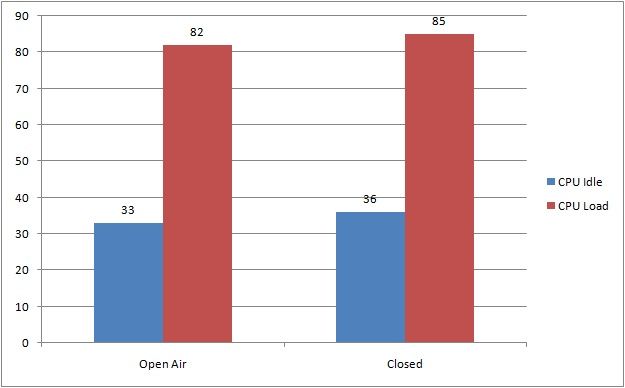
In this test, we have 2 different scenario : 
1. side panel of the chassis is closed
2. side panel of the chassis is opened

Both test uses the maximum heat stress test on Prime95 to test the efficiency of the Black Edition. The duration of the test is 30 minutes for each and the result is shown in the graph below. 


The result is rather pleasing, the i7 4770K we have here is pretty much a let down as it produces massive amount of heat - much more than its predecessor. The Black Edition along with the GC-Extreme thermal compound did a fine job in keeping this sizzling hot chip at a fine temperature. 

The fans however, is rather noisy compared to some of the competitors especially Noctua. We believe that the Black Edition can did a whole lot better in both acoustic and thermal performance if you're willing to invest more in some seriously good fans but as far as it goes, it is still a pretty good performance you'll get out of the box.


Final Thoughts


After going through the Black Edition, we have to say that it is a solid performer that is able to perform as good as some highly rated air coolers but at the same time, there's some drawback you might want to take note:

Pros
- Solid fins which is less prone to accidental bending
- Dense fins and sealed side for a much focused airflow
- Large heat pipes for best heat transfer
- The included GC-Extreme is a heaven's gift, most manufacturer will give you thermal compound which we consider as not-so-useful.
- Tool free installation, you can basically secure all the included nuts and screws without using any tools

Cons
- Fans is rather noisy at full load
- RAM clearance issue, bad news for performance RAM with monstrous heatsink

The drawbacks won't be much of a concern if you fits the criteria of not having picky ears, uses low profile RAM or install dual channel RAM on the B channel. 

Making decision isn't a tough job for us as we do have picky ears, basically the cons is our concern is building a system. Without any hesitation, the Black Edition deserves a Silver Award and Recommended Award for the great features and great value.


Sunday, 25 August 2013

Thermalright Archon SB-E X2

For those of you who haven't a clue, Thermalright is a leading brand that specializes in producing high quality cooling components for the PC of today. Since 2001, Thermalright have brought us a few innovative solutions such as the wire fan clip mounting, the introduction of Heatpipes, the first 120mm fan mount and convex copper contact points which we are familiar and widely used today.

Previously, I had an unboxing article on the Thermalright Silver Arrow SB-E X2. Truth be told, A.P.E.S supplied two Thermalright products for unboxing and review; so once again, I thank the team for providing this great product for unboxing & review. And now..... meet the Thermalright Archon SB-E X2.


Product Specification

Here is the spec sheet straight from the official Thermalright website.

Heatsink Specifications:Dimension: L155 mm x W53.6 mm x H170.2 mm
Weight: 750g
Heat pipes: Eight 6mm Copper Heatpipes
Fin: T = 0.5 mm ; Gap = 1.9 mm
Fin Pcs: 28 + 6 + 5 = 39 pcs
Copper Base: C1100 Pure Copper Mirror Finished base with Nickel Plating
Motherboard to Fin: 27 + 8 = 35 mm
TY-141 FAN Spec (x2)
Dimension: L152 mm x H140 mm x W26.5 mm
Rated Speed: 900~1300RPM±15%
Weight: 175g
Noise Level: 17~21 dBA
Air Flow: 28.3 - 73.6CFM


The Archon comes in Thermalright's traditional packaging, a square brown box with the Thermalright branding at the top and the name of the product on the lower part of both sides. As I have said before, I like this approach of keeping it simple. It also helps to keep the cost down, at RM265, it's not too expensive either.

The Unboxing


Opening the flap reveals the Instruction booklet and sticker on top of the accessory box.


Setting those aside, you find soft foam that covers the included fans.


And finally, removing the fans will reveal the Archon heatsink which is further protected with an extra wrapping of clear plastic with a pack of "do-not-eat" to keep things dry.


Here is everything that comes out of the box.

Accessories Pack


The accessories pack contains everything you will need to mount the Archon in your system. here is a list of all the items inside the package:

  1. Anchoring Bracket Mount x1
  2. Intel Multiple Support Backplate x1
  3. AMD Backplate x1
  4. Pressure Mount Adjustable Mounting Plate x1
  5. Screw Pillars x4
  6. LGA2011 Screw Pillar Type C x4
  7. Thumbscrew cap x4
  8. White Plastic Washer x4
  9. Backplate Cap x1
  10. Andled Wrench x1
  11. Anti Vibration Pad x8
  12. PWM Y-Cable x1
  13. Thermal Paste x1
  14. Fan Clip x4

As with the Silver Arrow that I unboxed before, the mounting parts are well made and doesn't bend under pressure; definitely not one of those plastic backplate braces that you'd see on other offerings. Other small gestures such as the rubber noise dampeners and PWM Y-cable adaptors really tells you how detailed Thermalright were about quality.

The Heatsink


Compared to the dual tower fin stack of the Thermalright Silver Arrow that was unboxed recently, the Archon features a slim tower design that is aimed to provide clearance to tall RAMs without sacrificing the cooling potential. Even with both fans installed, the total thickness should not cover even the first RAM slot on a crowded Intel socket LGA2011 motherboard. We shall see how the arrangement looks like once we get it anchored to my system.


The Archon employed eight 6mm heatpipes is arranged in a U-shaped, zig-zag array which is divided into different sections of the fins stack ensures even distribution of heat out of the CPU. This is two more than the Noctua NH-D14 given the size of the Archon in comparison.


A look from the bottom shows the unique distribution of heatpipes spread into different sections of the fin stack. Another tradition of Thermalright: the nickel-plated copper contact point is polished to mirror finish.

The Fans


The dual TY-141 PWM fans supplied in Thermalright colours may not be everyone's cup of tea but the double ball bearing 140mm PWM fans are supposedly very silent, rated at only 21dB(A) during operation, thanks to their Silent Torpedo Blades design. The sleeving on the TY-141 is thick and of good quality as well which would be a boon to cable management.


Here is how the HSF assembly looks like with both fans mounted.

Mounting The Archon


Prepping my CPU, nothing much, might be an antique to some of you. I took the motherboard out of the chassis to show you guys the mounting process, flipping the whole chassis is somewhat not ideal.


Placing the AMD backplate at the back of the motherboard.


Securing the backplate with the screw pillars.


The anchoring bracket mount comes next...


and is secured with thumbscrew caps.


The heatsink comes next, just remember to apply the thermal paste and peel the protective sticker before this process. Secure the heatsink with the pressure adjustable mounting plate.


Thermalright's proprietary Pressure Vault mounting mechanism is very ingenious indeed. Unlike most HSF mountings where you have to adjust every screw to increase the mounting pressure, this one allows you to increase the mounting pressure simply by twisting the centre screw after securing everything else. Thermalright supplied a wrench for this, each 1/2 a rotation from the middle point of the pressure adjustable mounting plate supposedly adds 10lbs (about 4.5kg) of pressure to the mounting, ensuring good contact.


I undid the mount to check the spread of the thermal paste. Looks good to me.


After re-mounting the Archon, I mounted the fans to check the RAM clearance. From the picture above, you can tell that I wasn't disappointed with Thermalright's claim of the Archon being a thin cooler. those of you with fancy tall RAMs will have no trouble with the Archon, the 140mm fans could even aid in cooling the RAMs.


Just another shot of the Archon fully mounted, not too shabby.

Testing

The Thermalright Archon SB-E X2 will be pitched against the CoolerMaster Hyper 212+ (push/pull) on an AMD PhenomII 710 x3. Temperatures will be recorded via CPUID HWMonitor v1.23.0. for both Idle and load. Since this is a 95W TDP CPU, I ran Prime95 (v25.11 build 2) on blend test to max everything out along with the MSI Kombustor to load the GPU to produce the extra heat in the chassis.

Cooler Idle (°C) Load (°C)
CoolerMaster Hyper 212+ 29 - 35 53
Thermalright Archon SB-E X2 23 - 28 38

Truth be told, I wasn't expecting any major improvements, with the Malaysian weather being the way it is and besides, the Hyper 212+ has kept the temperatures down all this time, but looking at the results, you could imagine how I was dead wrong. I mean just look at the differences! 6 to 7 degrees C improvements on idle is probably not much difference but the load is a whopping 15 degrees C lower! and for the record, this is done in a non-air conditioned room. I'm very impressed indeed.

Conclusion

So if you're looking for an improvement over your CPU stock cooler, the Thermalright Archon is should definitely be on your shortlist. I was already impressed by the design at first, from the mirror polished heatsink to the meticulously designed mounting system, Thermalright's dedication to quality is the finest I've seen. I need not say anymore about the performance, the numbers do not lie.

Okay, there are probably something that would prevent you getting the Archon. First of all, your chassis would need to have a clearance of 170mm for the CPU cooler as most users I know will most likely have mid towers or smaller chassis. The sheer size and weight of it will deter some users as well, the idea of having a big chunk of metal hanging from their motherboard is not to everyone's taste even if they have a full tower chassis and would opt for water-cooling loops instead; the colour combination of the two fans are not helping in this sense either.

Having said that though, the Archon's advantages outweighs it's disadvantages. This is an air-cooler that would rival the performance of many AIO water cooling loops! (according to multiple sources) and being at about half the price of AIO water coolers will allow users to get their hands on a more decent parts for their Rigs. Aside from that, there is no worries of leakage and the low maintenance means more time for gaming and less time fussing about.

I think this will be my top HSF for quite some time and builds.

Pros:
  • Excellent quality and design
  • Affordably priced
  • Cooling capabilities rivals AIO loops
  • Solid mounting system
  • Doesn't block RAM slots

Cons:
  • A little heavy and tall
  • Odd coloured fans